
Partner to PCC EHR: Where do I do that?
PCC’s Partner Practice Management suite is retiring! If you are a longtime Partner user, you may wonder when programs are retiring and where the new tools are located in PCC EHR.
Use the Q&A below to learn more about the retirement, and use the tables of tasks to learn about PCC EHR features and watch demonstrations.
Contents
Questions and Answers About Partner's Retirement
-
Why is PCC retiring Partner?
Partner has served our pediatric community for decades, and the landscape of pediatric healthcare technology has evolved. To ensure we are providing the most powerful, competitive, and user-friendly tools possible, we are transitioning our focus entirely to PCC EHR.
Here is why this transition is necessary and how it benefits your practice:
Better Tools to Help Your Practice Succeed: Technology has come a long way since we developed Partner. Moving the functionality to PCC EHR allows us to make improvements that we couldn’t previously accomplish in Partner.
- In PCC EHR, you can have greater control when you edit payments, charges, and other encounter information.
- In PCC EHR, you can use integrated workflows that reduce errors and give billers more power as they chase down A/R.
- In PCC EHR, you can save time with more automated tasks, like improved ERA processing.
- In PCC EHR, PCC will be able to introduce amazing new functionality, like:
- Credit card on file
- Automatic billing fees for overdue accounts
- Retrieving claim status from the payor (see PCC 10.5)
- and more
More Resources Towards New Features You Need: As long as Partner remains in use at some practices, PCC needs to maintain backward compatibility with Partner functionality. This slows down our efforts to develop new features and meet the needs of pediatric practices in innovative ways. By retiring Partner, we’ll be able to deliver more of what you need, faster.
Easier, Faster Training: Training new staff on PCC EHR is less challenging and reduces the burden on existing staff. Pediatric practices have told us that Partner’s difficult learning curve and antiquated interface have impacted employee retention and job satisfaction. PCC EHR is a modern, intuitive interface with over fifteen years of continuous development.
Safety and Security: Functionality in PCC EHR includes additional safety features and interface improvements, saving clients from mistakes that cost time and money.
-
When is PCC retiring each Partner program?
Here’s our tentative retirement timeline for 2026!
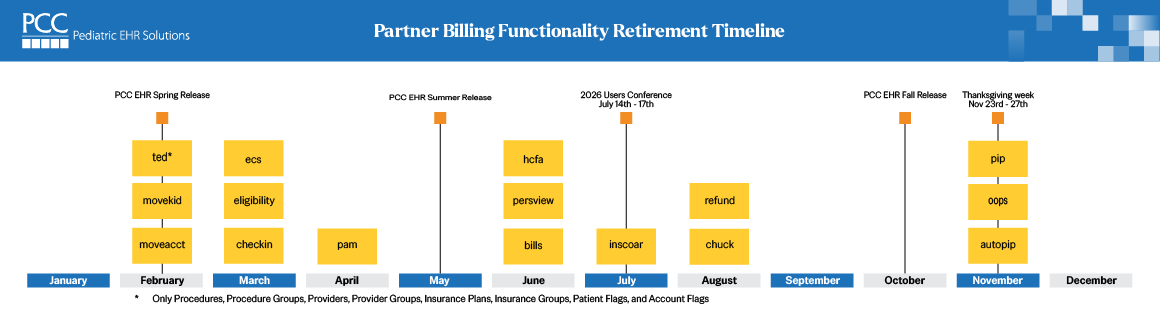
Read the detailed tables below to learn when each Partner task will be deprecated and learn where to perform the same function in PCC EHR.
-
What about Partner programs that are not shown on the retirement timeline?
We’ll update the above timeline as retirement planning continues.
Some programs, like managing your allowable schedules (
allowedit), are not on the timeline because PCC has not yet migrated the functionality. Every task your office needs to perform will have an equivalent-or-better workflow in PCC EHR. -
How do I do that in PCC EHR?
The tasks you perform in Partner have a more capable, easier-to-use equivalent in PCC EHR.
See the chart below.
-
Where can I learn more about the PCC EHR tools?
Here’s how to learn more:
Attend a Weblab
Come join us for a Partner to PCC EHR Migration weblab! A PCC support specialist will share new functionality, walk you through the changes, and answer questions.
-
Episode 01: Combine Patients, Combine Accounts, Edit Tables: Watch Recording (2026-02-05)
-
Episode 02: Submit Claims, Check Patient Eligibility, Checkin Patients: Watch Recording (2026-03-11)
-
Sign Up!: Visit PCC’s Events & Trainings page to sign up for upcoming sessions!
More Ways to Learn
-
'How Do I Do That?' Reference: Use the chart below to learn where to find functionality in PCC EHR, and click on a link to watch a demo.
-
Pediatric Billing Drop-In Sessions: Every month, PCC’s “Get Paid” team hosts a drop-in session for pediatric billers. Along with answering your billing questions, we’ll be talking about retiring tools and previewing upcoming features.
-
Billing Outline: You can learn all of PCC’s billing tools by checking out the Biller Training Outline.
-
Long-Form Billing Training: You can also attend one of our periodic long form Billing Training sessions.
-
Get In Touch!: Give us a call, send us an email, come to the Users’ Conference. PCC is ready to help your billers and staff. We’re proud of what Partner accomplished over its 40 year history, and we’re excited for what the future will bring!
-
-
What about Notify?PCC has bold new plans for appointment notifications and more coming soon to PCC EHR.
In the meantime, PCC’s existing Notify functionality, which includes a Partner configuration tool and Partner-based logs, will not be retired and will continue to work as expected.
-
What about reporting features in Partner?
PCC’s Partner program suite and PCC EHR include lots of reporting functionality and customizable reporting tools.
At this time, PCC does not plan on retiring Partner’s reporting tools in 2026. We are focused on migrating all users to PCC EHR for core billing tasks and day-to-day needs.
Partner’s Smart Report Suite (
srs), along with familiar reports likedaysheetanddeposit, will continue to function until those needs are met by equivalent reports or workflow tools in PCC EHR. -
How do I reconcile checks w/ reversals when I autopost in PCC EHR?
Some users have reported that they do not wish to autopost incoming ERAs in PCC EHR because of negative payments not appearing as expected in reporting.
In PCC 11.0, PCC EHR’s reconciliation reports will better accommodate takebacks. You’ll be able to record the new check number with the reversal, making it easier to audit check totals.
In the meantime, Partner reports (like
daysheet) can be used to reconcile.
Retiring in February 2026
| Task | Partner Practice Management | PCC EHR | Learn More |
|---|---|---|---|
| Merge duplicate patient records | Combine Two Patients (movekid) |
Combine Patients | read manual |
| Merge duplicate account records | Combine Two Accounts (moveacct) |
Combine Accounts | read manual |
| Edit procedures, prices, and reporting groups | The Procedures and Procedures Groups tables in the Table Editor (ted) |
The Procedures and Procedure Groups tables in the Tables tool | read manual watch video |
| Edit clinician billing information and reporting groups | The Providers and Provider Groups tables in the Table Editor (ted) |
The Providers and Provider Groups tables in the Tables tool | read manual watch video |
| Edit your system’s insurance plans and payor reporting groups | The Insurance Plans and Insurance Groups tables in the Table Editor (ted) |
The Insurance Plans and Insurance Groups tables in the Tables tool | read manual watch video |
| Configure your practice’s Patient and Account Status Flags | The Patient Flags and Account Flags tables in the Table Editor (ted) |
The Patient Flags and Account Flags tables in the Tables tool | read manual watch video |
Retiring in March 2026
| Task | Partner Practice Management | PCC EHR | Learn More |
|---|---|---|---|
| Check in a patient | Patient Checkin (checkin) |
Check In a Patient | read manual watch video |
| Check insurance eligibility for tomorrow’s patients | Patient Eligibility (elig) |
Insurance Eligibility tool | read manual |
| Check insurance eligibility for any patient | Patient Eligibility (elig) |
Insurance Eligibility component | read manual |
| Process and submit claims | ECS (preptags, ecs) |
Claims tool | read manual watch video |
| Review claims that couldn’t be submitted | ECS (preptags), the “Bad Claims” report (ecsreports) |
The Needs Correction tab in the Claims tool | read manual watch video |
| Set up a claim hold for a clinician’s claims | Only available through PCC Support | Claims tool | read manual watch video |
| Set your practice’s standard claim delay | Only available through PCC Support | Claims tool | read manual watch video |
Retiring in April 2026
| Task | Partner Practice Management | PCC EHR | Learn More |
|---|---|---|---|
| Post a personal payment | Post Payments (pam) |
Payments tool | read manual watch video |
| Write-off Unpaid Charges and Bad Debt | Post Payments (pam) and Correct Mistakes (oops) |
The Payments tool | read manual watch video |
Retiring in June 2026
| Task | Partner Practice Management | PCC EHR | Learn More |
|---|---|---|---|
| Work on personal A/R | Personal Money Tracking Assistant (persview) |
The Personal Balances tool | read manual watch video |
| Print a paper HCFA claim form for an encounter | Correct Mistakes (oops) |
Edit Charges | read manual |
| Print a batch of HCFA claims that could not be sent electronically | Correct Mistakes (oops) |
Claims | read manual |
| Generate personal account bills | Print Bills (bills and ebs) |
The Bills tool | read manual watch video |
| Print a single account bill for a family | Payments tool | read manual watch video |
Retiring in July 2026
| Task | Partner Practice Management | PCC EHR | Learn More |
|---|---|---|---|
| Work on insurance A/R | Insurance Aging (insaging) and Insurance Accounts Receivable Details (inscoar) |
The Unpaid Encounters tab of the Insurance Balances tool | read manual watch video |
Retiring in August 2026
| Task | Partner Practice Management | PCC EHR | Learn More |
|---|---|---|---|
| Post charges for an encounter | Post Charges (chuck, checkout) |
Post Charges | read manual watch video |
| Post a fee or another type of administrative encounter | Post Charges (chuck, checkout), Refund (refund) |
Billing History | read manual |
| Post charges for a hospital encounter | Post Charges (chuck, checkout) |
Billing History | read manual watch video |
| Refund or Write-off Credits | Refund (refund) and Correct Mistakes (oops) |
The Payments tool | read manual watch video |
| Post less common payments, like capitation checks, incentive payments, interest payments, overpayments, and withhold payments | Refund (refund), Post Payments (pam) and Correct Mistakes (oops) on a holding account |
Creating an administrative encounter for a holding account in the Billing History | read manual watch video |
Post an Insurance Reversal (“takeback”) |
Refund (refund) and Correct Mistakes (oops) |
The Insurance Payments tool | read manual watch video |
Retiring in Fall of 2026 and Winter 2027
| Task | Partner Practice Management | PCC EHR | Learn More |
|---|---|---|---|
| Automatically Post ERAs | Autopost (autopip) |
Electronic Remittance Advice Tool | read manual watch video |
| Review ERA responses that couldn’t be autoposted | The “manual” report in EDI Reports (edireports, ecsrports) |
Posting Exceptions worklist in the Electronic Remittance Advice tool | read manual watch video |
| Review the full ERA for unusual responses or special situations | EDI Reports (edireports, ecsreports) |
Electronic Remittance Advice tool | read manual watch video |
| Manually Post Insurance Payments | Post Insurance Payments (pip) |
Insurance Payments tool | read manual watch video |
| Review an encounter’s charges, specific billing details, and history of all claims | Correct Mistakes (oops) |
Billing History | read manual watch video |
| Edit an encounter’s charges, claim information, and fix mistakes | Correct Mistakes (oops) |
Edit Charges | read manual watch video |
| Queue up a resubmission, corrected claim, or an appeal | Correct Mistakes (oops) |
Edit Charges | read manual watch video |
| Change the responsible party for posted charges | Correct Mistakes (oops) |
Edit Charges | read manual watch video |
| Change the copay amount due for posted charges | Correct Mistakes (oops) |
Edit Charges | read manual watch video |
| Add claim information, such as the Payor Claim Control # or an attachment ID, to an encounter | Post Charges (chuck, checkout), Correct Mistakes (oops) |
Post Charges or Edit Charges | read manual watch video |
| Enter or review encounter billing notes | Correct Mistakes (oops) |
Encounter Billing Notes component | read manual watch video |
| Unlink a payment from one charge and link it to another | Correct Mistakes (oops) |
The Payments tool | read manual |
| Delete a Refund, Write-off, or Reversal Posted in Error | Correct Mistakes (oops) |
The Payments tool | read manual |
All Tasks and Functions
| Task | Partner Practice Management | PCC EHR | Learn More | |
|---|---|---|---|---|
| Schedule a patient | Scheduling Appointment Minder (sam) |
Appointment Book | read manual | |
| Update a patient’s insurance policies | Policy (policy), found in the Patient Editor (notjane) and other tools |
Policies component | read manual watch video |
|
| Check insurance eligibility for tomorrow’s patients | Patient Eligibility (elig) |
Insurance Eligibility tool | read manual | |
| Check insurance eligibility for any patient | Insurance Eligibility component | read manual | ||
| Check in a patient | Patient Checkin (checkin) |
Check In a Patient | read manual watch video |
|
| Explain to a family why they have a balance due | Collection report (coll) |
Account Balances component | read manual | |
| Review or print a full history of all transactions for a family | Account History (tater), F3 in fame |
Account History | read manual watch video |
|
| Post a personal payment | Post Payments (pam) |
Payments tool | read manual watch video |
|
| Print a receipt for a single encounter or all payments for a year | The Collection Report (coll) |
Payments tool | read manual watch video |
|
| Print a single account bill for a family | Payments tool | read manual watch video |
||
| Merge duplicate patient records | Combine Two Patients (movekid) |
Combine Patients | read manual | |
| Merge duplicate account records | Combine Two Accounts (moveacct) |
Combine Accounts | read manual | |
| Post charges for an encounter | Post Charges (chuck, checkout) |
Post Charges | read manual watch video |
|
| Review an encounter’s charges, specific billing details, and history of all claims | Correct Mistakes (oops) |
Billing History | read manual watch video |
|
| Edit an encounter’s charges, claim information, and fix mistakes | Correct Mistakes (oops) |
Edit Charges | read manual watch video |
|
| Queue up a resubmission, corrected claim, or an appeal | Correct Mistakes (oops) |
Edit Charges | read manual watch video |
|
| Change the responsible party for posted charges | Correct Mistakes (oops) |
Edit Charges | read manual watch video |
|
| Change the copay amount due for posted charges | Correct Mistakes (oops) |
Edit Charges | read manual watch video |
|
| Add claim information, such as the Payor Claim Control # or an attachment ID, to an encounter | Post Charges (chuck, checkout), Correct Mistakes (oops) |
Post Charges or Edit Charges | read manual watch video |
|
| Print a paper HCFA claim form for an encounter | Correct Mistakes (oops) |
Edit Charges | read manual | |
| Print a batch of HCFA claims that could not be sent electronically | Correct Mistakes (oops) |
Claims | read manual | |
| Enter or review encounter billing notes | Correct Mistakes (oops) |
Encounter Billing Notes component | read manual watch video |
|
| Enter or review account notes | The Family Editor (fame) |
Account Notes component | read manual watch video |
|
| Post a fee or another type of administrative encounter | Post Charges (chuck, checkout), Refund (refund) |
Billing History | read manual | |
| Post charges for a hospital encounter | Post Charges (chuck, checkout) |
Billing History | read manual watch video |
|
| Process and submit claims | ECS (preptags, ecs) |
Claims tool | read manual watch video |
|
| Review claims that couldn’t be submitted | ECS (preptags), the “Bad Claims” report (ecsreports) |
The Needs Correction tab in the Claims tool | read manual watch video |
|
| Set up a claim hold for a clinician’s claims | Only available through PCC Support | Claims tool | read manual watch video |
|
| Set your practice’s standard claim delay | Only available through PCC Support | Claims tool | read manual watch video |
|
| Review and resolve claim rejections | Claim Error Report (srs) |
Claim Rejections worklist in the Insurance Balances tool | read manual watch video |
|
| Review claim acknowledgements and other payor and clearinghouse responses | ECS Reports (ecsrports) |
Billing History | read manual | |
| Automatically Post ERAs | Autopost (autopip) |
Electronic Remittance Advice Tool | read manual watch video |
|
| Review ERA responses that couldn’t be autoposted | The “manual” report in EDI Reports (edireports, ecsrports) |
Posting Exceptions worklist in the Electronic Remittance Advice tool | read manual watch video |
|
| Review the full ERA for unusual responses or special situations | EDI Reports (edireports, ecsreports) |
Electronic Remittance Advice tool | read manual watch video |
|
| Manually Post Insurance Payments | Post Insurance Payments (pip) |
Insurance Payments tool | read manual watch video |
|
| Post less common payments, like capitation checks, incentive payments, interest payments, overpayments, and withhold payments | Refund (refund), Post Payments (pam) and Correct Mistakes (oops) |
Creating an administrative encounter for a holding account in the Billing History | read manual watch video |
|
| Reconcile payment amounts, “prove out” | Deposit (deposit) |
Payment Totals by Check Number and Payment Reconcilliation reports in the Report Library | read manual read manual |
|
| Edit posted payment amounts | n/a | The Payments and Insurance Payments tools | read manual watch video |
|
| Unlink a payment from one charge and link it to another | Correct Mistakes (oops) |
The Payments tool | read manual | |
| Refund or Write-off Credits | Refund (refund) and Correct Mistakes (oops) |
The Payments tool | read manual watch video |
|
Post an Insurance Reversal (“takeback”) |
Refund (refund) and Correct Mistakes (oops) |
The Insurance Payments tool | read manual watch video |
|
| Write-off Unpaid Charges and Bad Debt | Post Payments (pam) and Correct Mistakes (oops) |
The Payments tool | read manual watch video |
|
| Delete a Refund, Write-off, or Reversal Posted in Error | Correct Mistakes (oops) |
The Payments tool | read manual | |
| Generate personal account bills | Print Bills (bills and ebs) |
The Bills tool | read manual watch video |
|
| Work on personal A/R | Personal Money Tracking Assistant (persview) |
The Personal Balances tool | read manual watch video |
|
| Work on insurance A/R | Insurance Aging (insaging) and Insurance Accounts Receivable Details (inscoar) |
The Unpaid Encounters tab of the Insurance Balances tool | read manual watch video |
|
| Edit procedures, prices, and reporting groups | The Procedures and Procedures Groups tables in the Table Editor (ted) |
The Procedures and Procedure Groups tables in the Tables tool | read manual watch video |
|
| Edit clinician billing information and reporting groups | The Providers and Provider Groups tables in the Table Editor (ted) |
The Providers and Provider Groups tables in the Tables tool | read manual watch video |
|
| Edit your system’s insurance plans and payor reporting groups | The Insurance Plans and Insurance Groups tables in the Table Editor (ted) |
The Insurance Plans and Insurance Groups tables in the Tables tool | read manual watch video |
|
| Configure your practice’s Patient and Account Status Flags | The Patient Flags and Account Flags tables in the Table Editor (ted) |
The Patient Flags and Account Flags tables in the Tables tool | read manual watch video |
|
| Report on when payors paid more or less than your contract fee schedule (allowable amounts) | The Allowable Underpayments (and Overpayments) by Insurance Group reports in the Report Library | read manual | ||
| Configure per-charge billing behaviors, such as which procedures pend, use special schedules, do not appear on all claims for a payor, and similar | Special Information File Editor (ibar) |
Future PCC EHR Functionality and PCC Support Assistance | ||
| Requeue a large number of claims for a specific payor (perform a mass re-file) | Resubmit Claims (maketags) |
Future PCC EHR Functionality and PCC Support Assistance | ||
| Load your contractual fee schedule (“allowables”) into your PCC system and assign that schedule to insurance plans | Contract Fee Schedule Editor (allowedit) |
Future PCC EHR Functionality and PCC Support Assistance | ||